
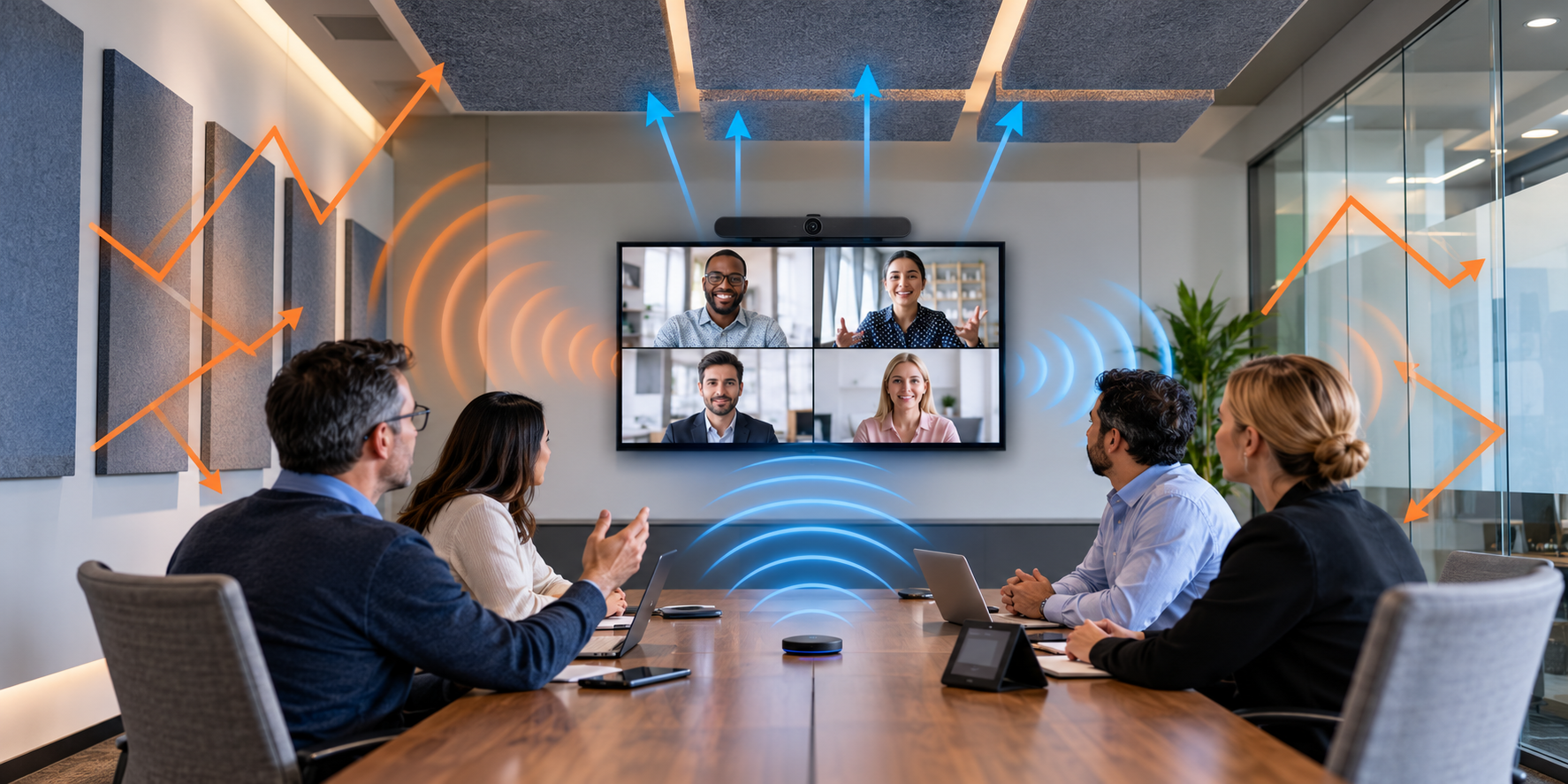
Video conferencing systems have improved significantly over the years, offering increasingly sophisticated microphones, speakers, artificial intelligence, and background noise reduction technologies. However, even expensive, professionally installed systems can produce disappointing audio quality when the room itself has poor acoustics.
In many cases, the problem is not the conferencing equipment. It is the way sound behaves inside the meeting room.
Hard walls, glass partitions, reflective tables, and untreated ceilings can cause sound to bounce around the room. These reflections interfere with speech, reducing clarity and making conversations more difficult, particularly for participants joining remotely.
Modern conferencing platforms such as Microsoft Teams and Zoom can automatically remove a surprising amount of background noise. However, there is a difference between removing unwanted sounds and fixing the acoustics of the room itself.
Understanding that difference can help you identify audio problems, choose the right equipment, and make improvements without unnecessarily replacing an entire conferencing system.
1. Recognizing Poor Room Acoustics
One of the first steps in troubleshooting conferencing audio is determining whether the room itself is contributing to the problem.
A poorly treated room may exhibit several recognizable symptoms:
- Remote participants complain that voices sound distant, hollow, or unclear.
- People have difficulty understanding certain words despite adequate microphone volume.
- Voices seem to linger or echo after someone finishes speaking.
- Speech becomes difficult to understand when multiple participants are talking.
- Participants experience listening fatigue during longer meetings.
- The room sounds excessively lively or noisy, even without the conferencing system operating.
These symptoms do not automatically mean that room acoustics are responsible. Poor microphone placement, incorrect microphone volume, or improperly configured audio processing can produce similar problems.
However, evaluating the room provides a useful starting point.
The Simple Clap Test
A basic way to identify potentially problematic acoustics is to clap your hands inside the meeting room and listen carefully to the resulting sound.
In a room with excessive reflections, the clap may produce a sharp, ringing, or rattling sound that appears to continue after the initial clap.
This is commonly experienced in empty offices, bathrooms, stairwells, and rooms containing large areas of glass or concrete.
In a more acoustically controlled room, the clap generally sounds shorter and less reflective.
Another useful exercise is to compare clapping in an empty room with clapping in a furnished bedroom or carpeted space.
The differences can be substantial.
The clap test is only a preliminary listening exercise. It cannot measure the room’s acoustic performance or identify every possible problem, but it can help reveal obvious reflections.
2. Understanding How Sound Behaves Inside a Meeting Room
To understand why some conference rooms sound bad, it helps to understand what happens when someone speaks.
When a person talks, sound travels through the air in multiple directions.
Some of that sound travels directly to the listener or microphone. This is known as direct sound.
The remaining sound encounters objects such as walls, ceilings, floors, furniture, and windows.
Depending on the materials involved, some sound is reflected, scattered, absorbed, or transmitted through those surfaces.
The microphone receives a combination of direct sound and reflected sound.
When those reflections become excessive, speech becomes more difficult to understand.
Specular Reflections, Diffuse Reflections, and Absorption
There are three particularly important acoustic behaviors to understand.
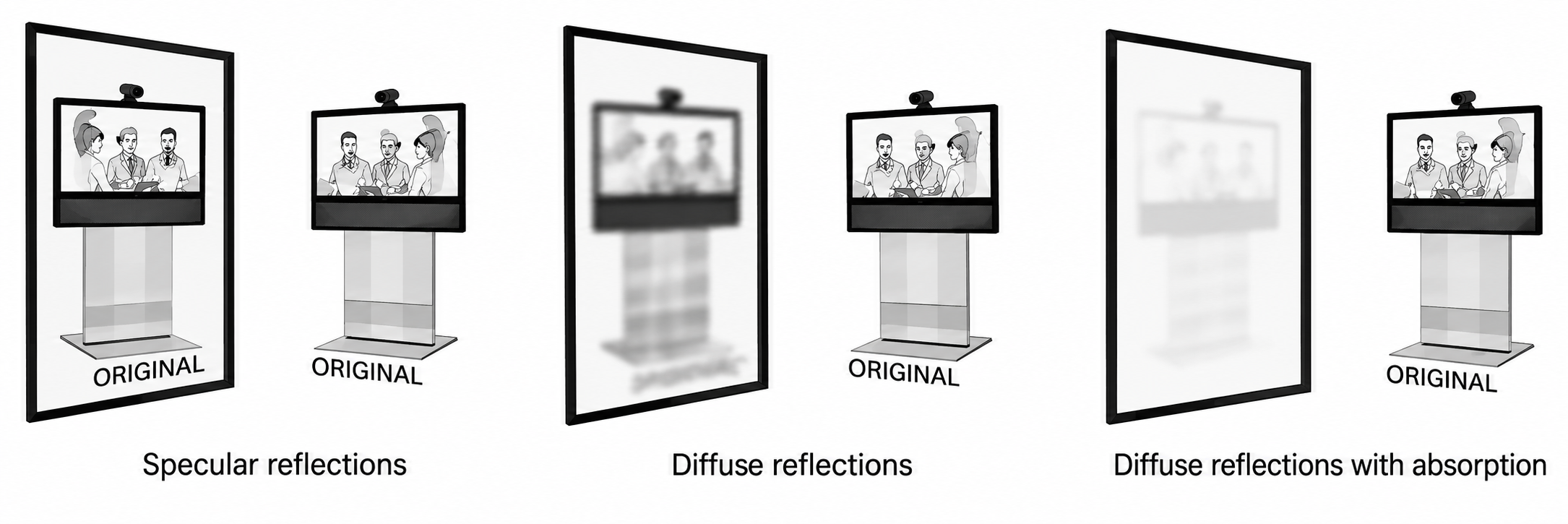
Figure 1. Comparison of direct reflections, scattered reflections, and reflections reduced through sound absorption.
Specular reflections occur when sound bounces off a hard surface in a relatively predictable direction, much like light reflecting from a mirror.
Large, flat surfaces such as glass walls, polished floors, and painted drywall commonly produce these reflections.
Diffuse reflections occur when sound is scattered in different directions instead of being concentrated in one direction.
Irregular surfaces and specially designed acoustic diffusers can help distribute reflected sound throughout a room.
Sound absorption occurs when materials absorb and dissipate some of the sound energy rather than reflecting it back into the room.
Carpets, suitable curtains, upholstered furniture, and acoustic panels can all contribute to sound absorption, although their effectiveness varies.
The distinction is important.
Diffusion changes where reflected sound travels, while absorption reduces the amount of sound energy returned to the room.
Both can be useful, but they solve different acoustic problems.
Why Parallel Walls Can Cause Problems
A particularly common issue occurs when sound repeatedly reflects between two opposing, parallel surfaces.
For example, a room with two untreated plaster walls facing each other may allow sound to bounce back and forth between them.
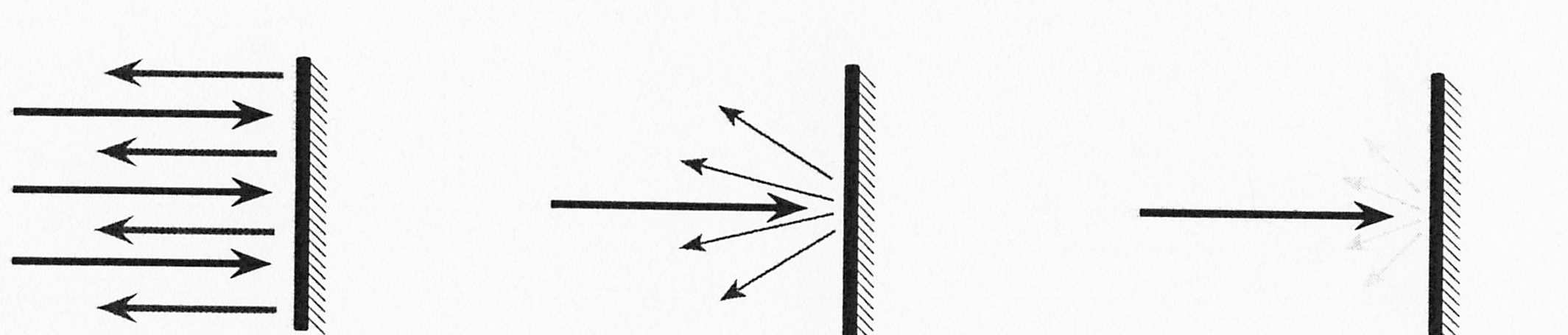
Figure 2. Three examples showing concentrated sound reflections, scattered reflections, and sound energy reduced by absorption.
The first illustration shows sound reflecting from a hard surface in a predictable direction.
The second shows sound scattering in multiple directions.
The third demonstrates how an absorptive surface reduces reflected sound energy.
These behaviors help explain several common problems.
Flutter Echo
Flutter echo occurs when sound repeatedly reflects between surfaces, often between two parallel walls.
Instead of hearing one distinct echo, a listener may hear rapid, repeated reflections that produce a ringing, metallic, or fluttering sound.
This effect is especially noticeable when clapping inside an untreated room.
Comb Filtering
Comb filtering occurs when the original sound combines with a slightly delayed copy of itself.
Some frequencies reinforce each other, while others partially cancel.
The result can make voices sound hollow, unnatural, or strangely colored.
Comb filtering can occur when reflected sound reaches a microphone or listener, or when the same sound is captured by multiple microphones and their signals are combined.
Reverberation
Reverberation is the persistence of sound after the original sound source stops.
Think about speaking inside a large empty hall. Even after you stop talking, your voice seems to continue briefly as sound reflects around the room.
That is reverberation.
A certain amount of reverberation is natural and can make a room sound pleasant. Too much, however, causes words and syllables to overlap.
For example, when one word is still reverberating as the next word is spoken, the two sounds can interfere with one another.
This is especially problematic for video conferencing, where microphones capture those reflections and transmit them to remote participants.
Reverberation is commonly evaluated using a measurement known as RT60, which describes how long it takes sound to decay by 60 decibels.
The appropriate reverberation time depends on the room’s size and intended purpose.
3. Start Acoustic Treatment at the Ceiling
One of the most effective places to begin acoustic treatment is the ceiling.
The reason is practical. A ceiling often provides a large, continuous surface that can be treated without interfering with furniture, displays, doors, or other room equipment.
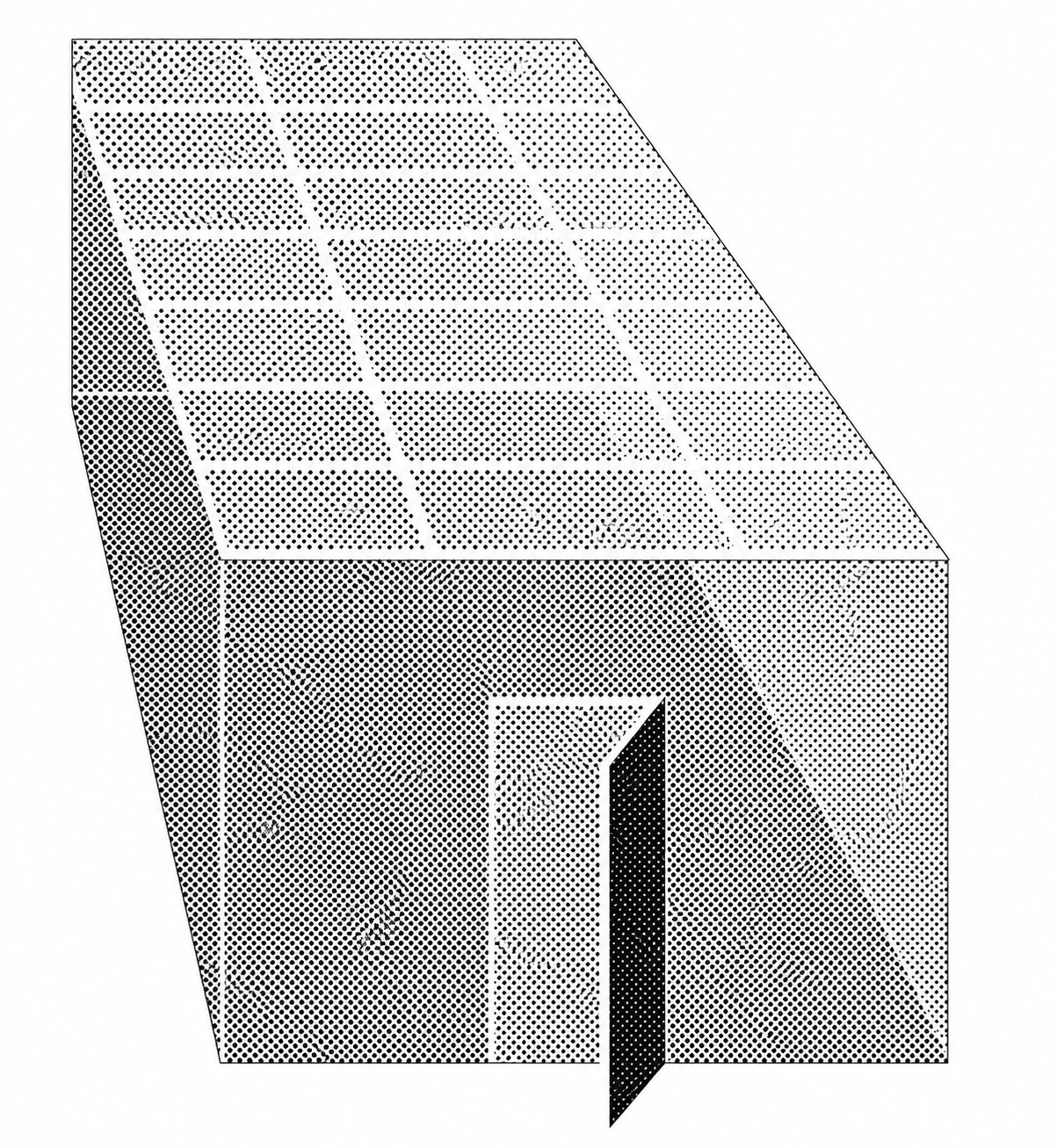
Figure 3. Sound-absorbing ceiling treatment covering a substantial portion of a meeting room.
A hard ceiling can reflect sound back toward microphones and participants, contributing to excessive reverberation.
Installing appropriate sound-absorbing ceiling tiles, suspended acoustic panels, or acoustic ceiling clouds can reduce these reflections.
The effectiveness depends on the material, thickness, installation method, and acoustic performance of the product.
Not all suspended ceiling tiles provide the same level of sound absorption.
Products designed specifically for acoustic control generally provide more predictable results than ordinary decorative ceiling materials.
Ceiling treatment can provide a significant improvement, but it may not eliminate the need to treat walls or other reflective surfaces.
4. Treat Walls to Reduce Unwanted Reflections
After evaluating the ceiling, the next step is to examine the walls.
Conference rooms frequently contain large reflective surfaces such as painted drywall, glass partitions, concrete, and decorative panels.
When opposite walls are left untreated, sound may repeatedly reflect between them.
A practical approach is to install absorptive treatment on at least one wall in each opposing pair of parallel walls.
If only two walls can be treated, selecting two adjacent walls is often a useful starting point.
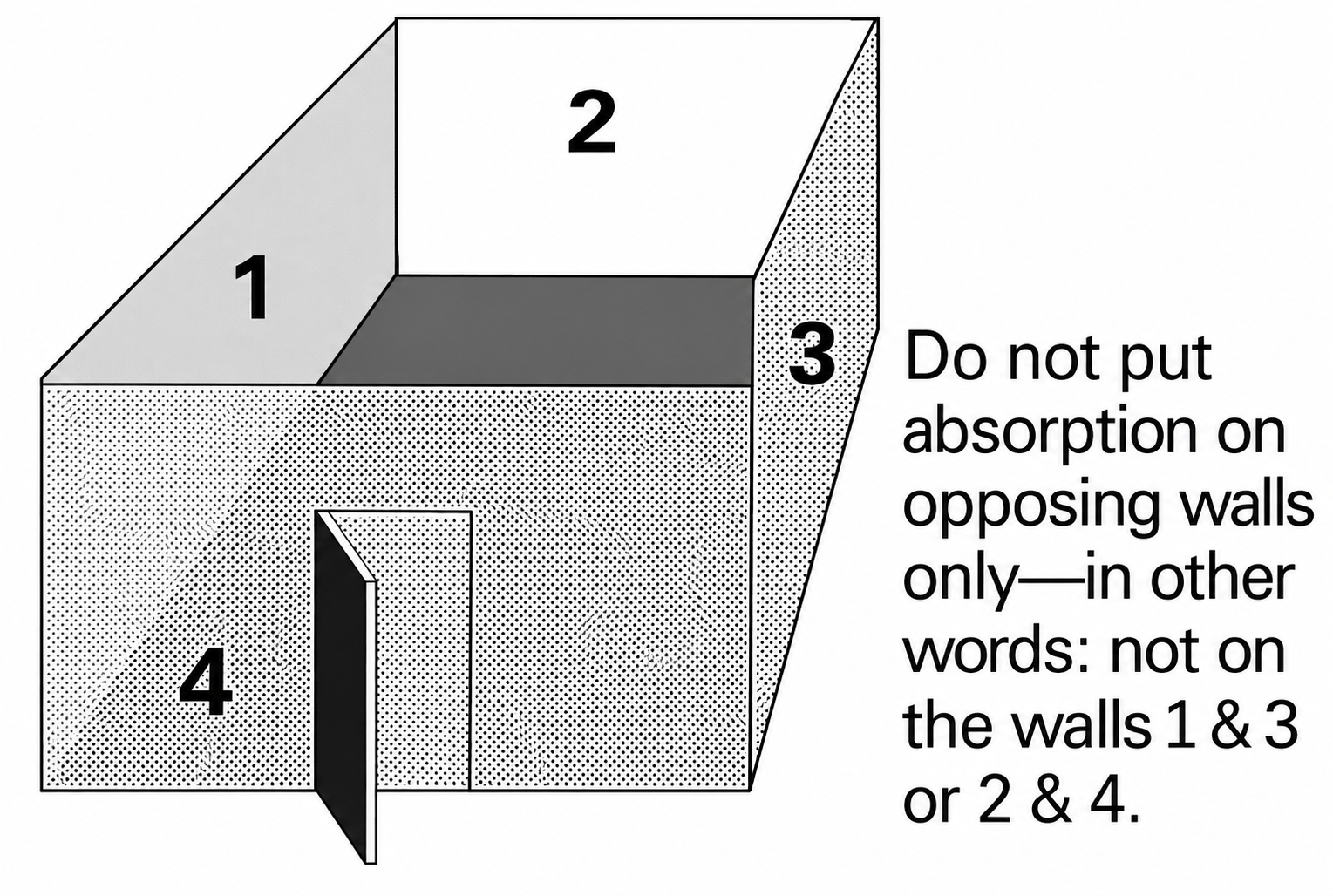
Figure 4. Example of adjacent wall treatment to reduce repeated sound reflections between opposing walls.
The illustration identifies four walls.
Possible treatment combinations include walls 1 and 2, 2 and 3, 3 and 4, or 4 and 1.
These combinations address reflections occurring across both main directions of the room.
Treating only two opposing walls can leave the other untreated pair capable of producing strong repeated reflections.
For improved acoustic performance, absorption can be distributed across additional wall surfaces as well as the ceiling.
The ideal arrangement depends on the room’s layout, dimensions, seating positions, and existing materials.
5. Distribute Acoustic Panels Instead of Concentrating Them in One Area
Another important consideration is how acoustic treatment is distributed.
Installing every acoustic panel in one location may leave large portions of the room untreated.
In many rooms, distributing absorptive materials across multiple areas produces better overall results.
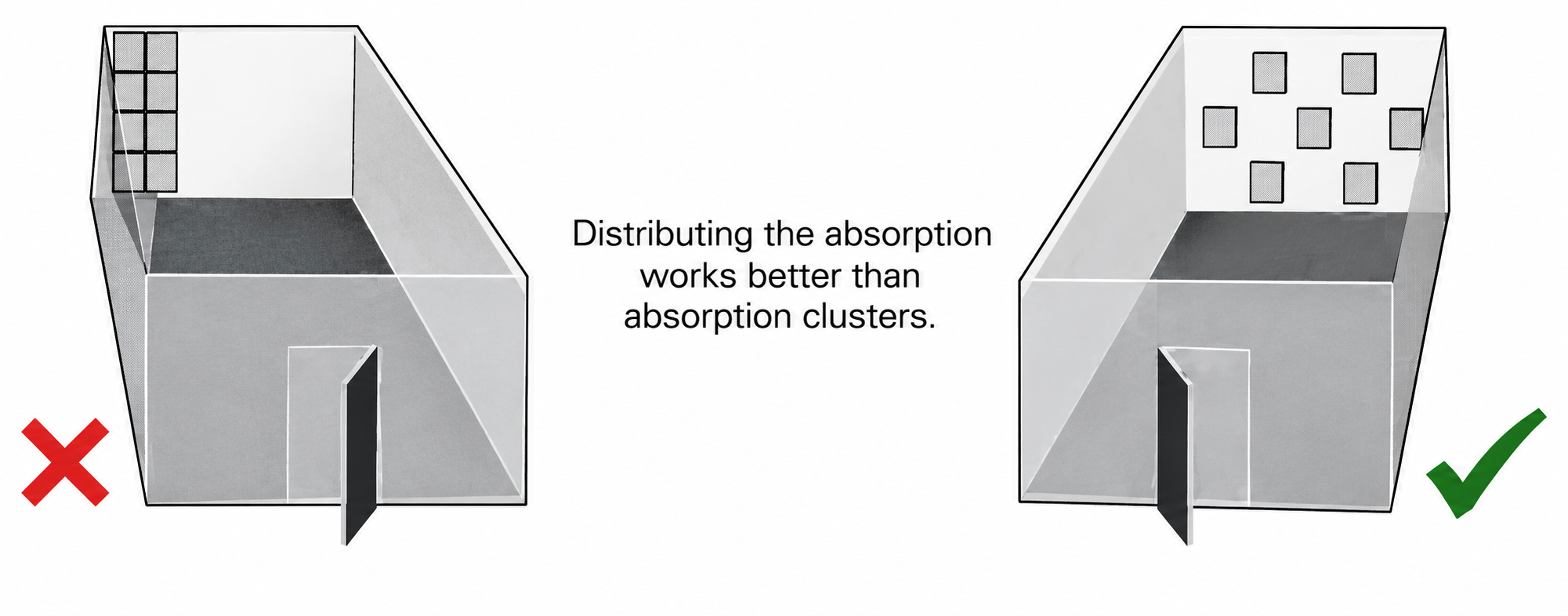
Figure 5. Comparison of clustered acoustic treatment on the left and distributed acoustic treatment on the right.
The left illustration shows acoustic treatment concentrated in one area.
Although these panels can absorb sound effectively where installed, large reflective surfaces remain elsewhere.
The right illustration shows absorptive materials spread across a larger area.
This arrangement can intercept reflections at more locations and reduce uninterrupted reflective surfaces.
For example, instead of installing every panel along a single rear wall, panels may be positioned along the side walls and rear wall to address multiple reflection paths.
This can be especially useful in conference rooms where people sit at different locations around a table.
However, simply spacing panels evenly is not always the best solution. Professional acoustic designs consider where sound reflections are most problematic and position treatment accordingly.
6. Large Whiteboards and Displays Can Contribute to Reflections
Conference rooms frequently contain whiteboards, interactive displays, framed artwork, and other large objects mounted on walls.
These items often have hard, reflective surfaces.
When a large flat surface is mounted parallel to an opposing wall, it may contribute to repeated sound reflections.
In some situations, slightly angling a reflective object can redirect sound away from the original reflection path.
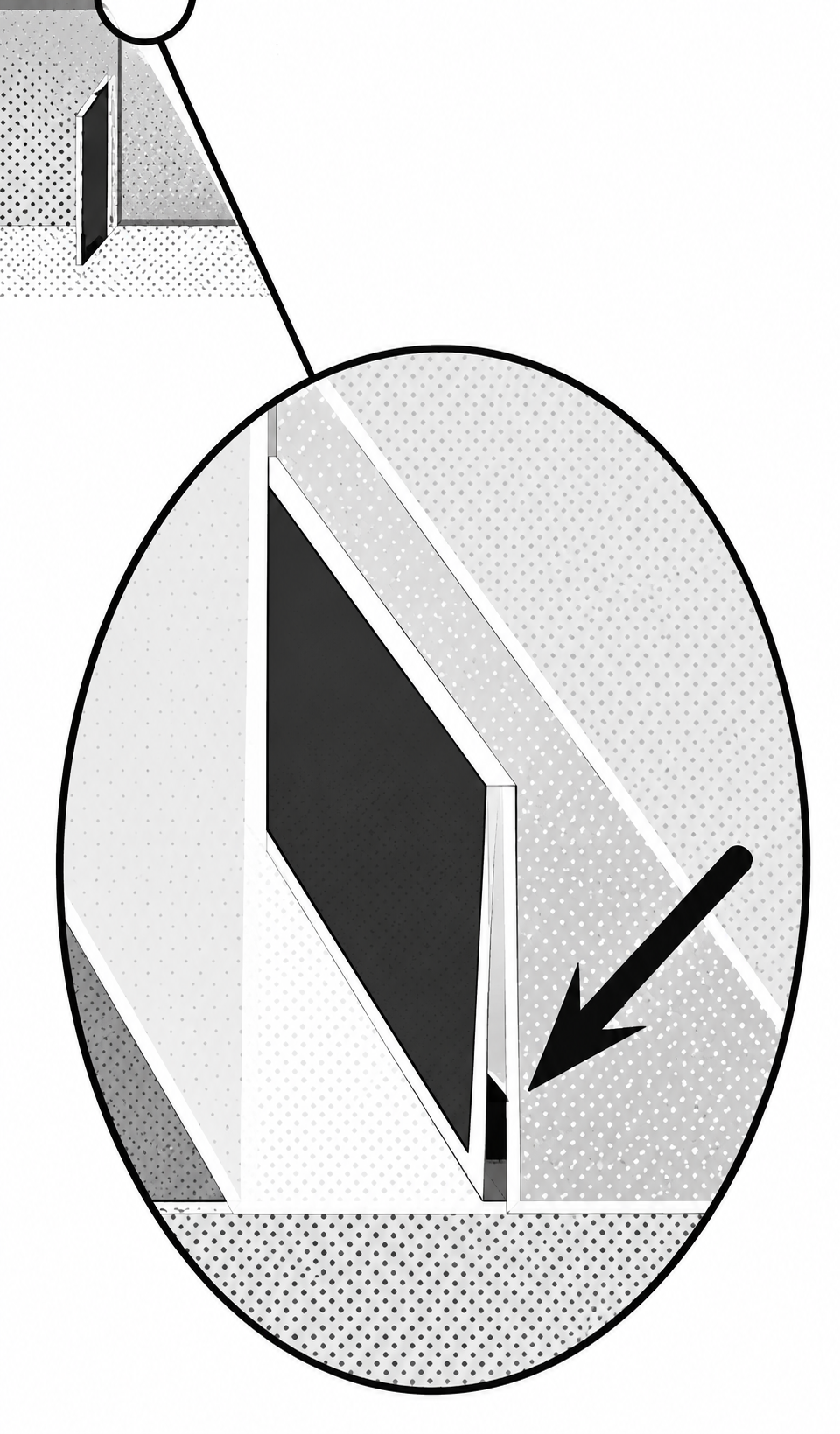
Figure 6. Using a spacer to angle a large reflective board away from a wall.
The purpose is not to absorb sound, but to change the direction in which it reflects.
This may reduce certain concentrated reflections between parallel surfaces.
However, angling a hard surface does not substantially reduce the total sound energy in the room.
It should therefore be viewed as a possible supplementary improvement rather than a replacement for sound-absorbing treatment.
Any adjustment to a display, whiteboard, or other mounted equipment must also account for safe mounting, viewing angles, and manufacturer installation requirements.
7. Soft Furnishings and Acoustic Materials
Not every acoustic improvement requires major construction.
Introducing sound-absorbing materials can improve a room that currently contains mostly hard surfaces.
Examples include:
- Carpets and appropriate area rugs.
- Upholstered chairs and sofas.
- Heavy curtains.
- Acoustic wall panels.
- Suspended acoustic ceiling panels.
- Other purpose-built sound-absorbing materials.
The effectiveness of these materials depends on their construction and the frequencies being absorbed.
Curtains and Wall Treatments
Heavy curtains can help reduce reflections from windows and large glass surfaces.
Their performance depends on the material, thickness, fullness, and mounting arrangement.
Leaving an appropriate air gap between a porous absorber and a hard surface can improve absorption at some lower frequencies.
For some curtain arrangements, a gap of approximately 4 to 8 inches (10 to 20 centimeters) may be useful.
This is not a universal requirement for every acoustic product.
Carpeting and Upholstered Furniture
Carpeting can reduce some reflections from hard flooring, particularly at higher frequencies.
Upholstered furniture can provide additional absorption.
However, these materials alone are unlikely to solve major reverberation problems in large rooms containing extensive glass, concrete, or other reflective surfaces.
Purpose-Built Acoustic Panels
Dedicated acoustic panels generally provide more predictable performance than decorative materials.
Panels may be constructed using mineral wool, fiberglass, or other tested sound-absorbing materials.
When selecting panels, consider their acoustic performance, thickness, mounting configuration, safety ratings, and suitability for the room.
A material that appears soft or porous is not necessarily effective across the full range of speech frequencies.
8. Background Noise Is a Separate Problem
Poor conferencing audio is not always caused by reflected sound.
Background noise can also make communication difficult.
Common sources include HVAC systems, traffic, adjacent meeting rooms, mechanical equipment, computer fans, and people talking nearby.
These sounds can mask speech and make participants work harder to understand one another.
People may also unconsciously raise their voices in noisy environments, a behavior known as the Lombard effect.
This can contribute to vocal strain and fatigue during longer meetings.
Sound Absorption Versus Sound Isolation
Two different problems need to be distinguished.
Sound absorption reduces reflections inside the room.
Sound isolation reduces the amount of sound entering or leaving the room.
Installing acoustic wall panels can help reduce reverberation, but those panels generally will not prevent traffic noise from entering through poorly sealed windows.
Similarly, adding curtains can reduce some internal reflections without providing the same sound isolation as properly designed windows or walls.
Solutions for unwanted outside noise may involve improved door seals, glazing, partition construction, or quieter mechanical equipment.
A room can have excellent internal acoustic treatment and still suffer from excessive external noise.
Both conditions need to be evaluated separately.
9. Modern Background Noise Removal in Microsoft Teams and Zoom
Modern video conferencing platforms have become substantially better at removing unwanted sounds.
Microsoft Teams and Zoom now include sophisticated audio processing technologies that can reduce background noise automatically, often without additional hardware.
These technologies can make a noticeable difference in offices, homes, and conference rooms.
For example, someone participating in a meeting may have a fan running nearby, a dog barking in another room, or people talking in the background.
Modern noise suppression systems can recognize many of these sounds and reduce how much of them is transmitted to the other meeting participants.
Some systems use artificial intelligence to distinguish human speech from unwanted background noise.
However, not all types of audio problems can be corrected equally well.
Microsoft Teams Noise Suppression
Microsoft Teams includes background noise suppression designed to reduce sounds such as keyboard typing, paper movement, doors closing, and other environmental noise.
Noise suppression is normally enabled by default, although available controls depend on the device and application.
The system analyzes microphone audio and attempts to reduce unwanted sounds while preserving speech.
This is particularly helpful for people participating from shared offices, homes, or other environments where background noise cannot always be controlled.
Microsoft Teams Voice Isolation
Teams also offers Voice Isolation, a more advanced feature that uses a voice profile to identify an individual speaker.
Instead of simply distinguishing speech from non-speech noise, Voice Isolation attempts to identify which voice belongs to the intended speaker.
It can then suppress surrounding voices and other unwanted sounds.
For example, if someone is working in an open office while nearby coworkers are talking, the system can prioritize that person’s voice and reduce competing speech.
This can be particularly useful with laptop microphones and headsets.
However, it introduces an important consideration for conference rooms.
If several people are speaking through one shared microphone, filtering audio to recognize only one person’s voice could remove speech that the remote participants actually need to hear.
Voice Isolation is therefore more appropriate for individual participation than for indiscriminately filtering a shared conference room microphone.
Zoom Background Noise Suppression
Zoom includes background noise suppression that can be adjusted according to the environment.
Its desktop application offers several levels of noise removal, including:
- Auto: Automatically adjusts suppression based on the background noise detected.
- Low: Applies minimal suppression, useful when some environmental sound should be preserved.
- Medium: Provides stronger suppression for typical office sounds such as fans and tapping.
- High: Applies more aggressive processing, including reducing competing background speech.
These settings allow users to balance unwanted noise removal against preserving the original audio.
More aggressive processing is not always better.
In some circumstances, strong suppression may affect quieter speech or other sounds that the meeting needs to capture.
Zoom Personalized Audio Isolation
Zoom also provides Personalized Audio Isolation.
This feature uses a voice profile to improve the distinction between the intended speaker and surrounding sounds.
Like personal voice isolation in Teams, it is particularly useful when someone is participating from an environment where other people are talking nearby.
An optional voice recording can improve the system’s ability to recognize the intended speaker, including when using certain built-in microphones rather than a headset.
Again, personal voice isolation should not automatically be applied to conferencing arrangements where several participants must be heard through the same audio input.
Noise Suppression in Dedicated Conference Room Systems
Dedicated Microsoft Teams Rooms and Zoom Rooms installations may use more advanced or specialized audio processing than a typical laptop.
Some systems include microphones with built-in processing, while others use separate audio processing equipment.
For example, a professionally installed conference room may use an audio processor that receives signals from multiple microphones, controls their volume, removes unwanted echoes, and sends a processed audio signal to the meeting platform.
Microsoft Teams Rooms on Windows can use Microsoft noise suppression alongside compatible microphone hardware. When certain certified external audio processors are present, echo cancellation may instead be handled by that equipment.
Teams Rooms on Android relies on the device manufacturer’s audio processing and firmware, so its available capabilities can differ from a Windows-based installation.
Zoom Rooms also supports software-based noise suppression and echo cancellation, including configurations where dedicated external equipment handles some or all of that processing.
This is why two conference rooms running the same conferencing application can produce noticeably different audio quality.
The room’s microphones, hardware, firmware, and processing configuration all influence the result.
10. How Audio Processing Works
Several technologies work together to improve conferencing audio.
Understanding their differences is useful when troubleshooting audio problems.
Background Noise Suppression
Background noise suppression attempts to reduce unwanted sounds while preserving speech.
Traditional systems were especially effective at reducing steady noises such as ventilation fans and electrical hum.
Newer systems can use advanced signal processing and AI to identify and reduce more complicated sounds, including keyboard typing, intermittent noises, and competing voices.
However, performance varies depending on the noise, the microphone, and the processing system.
Acoustic Echo Cancellation (AEC)
Acoustic echo cancellation addresses a different problem.
Imagine participating in a meeting where someone at the remote location is speaking.
Their voice plays through your conference room’s speakers. Your room’s microphone may then capture that sound and send it back to them.
Without proper echo cancellation, the remote participant may hear their own voice repeated after a delay.
Acoustic echo cancellation attempts to identify the sound originating from the loudspeakers and remove its contribution from the microphone signal.
Importantly, this is different from removing the natural reverberation of someone speaking inside the room.
AEC is primarily designed to prevent audio from the conferencing system’s loudspeakers from being transmitted back to the remote side.
Automatic Gain Control (AGC)
Automatic gain control adjusts microphone signal levels to maintain more consistent audio volume.
For example, if one participant speaks quietly and another speaks loudly, AGC can help reduce the difference in transmitted volume.
However, AGC does not inherently distinguish good sound from bad sound.
If a microphone captures substantial room noise or reverberation, raising the microphone signal can also increase those unwanted sounds.
Beamforming Microphones
Some conference room microphones use multiple microphone elements to emphasize sound arriving from particular directions.
This is known as beamforming.
Instead of listening equally in every direction, the system can electronically emphasize sound from the area where a person is speaking.
This can improve the proportion of desired speech relative to unwanted sounds arriving from other directions.
However, beamforming does not eliminate all room reflections.
Strong reflections may still arrive from multiple directions, and distant participants may still sound reverberant.
AI-Based Speech Enhancement
Newer audio systems may use machine learning to identify speech patterns, suppress competing sounds, and enhance the clarity of captured voices.
Some advanced systems also attempt to reduce the audible effects of reverberation.
These capabilities can be effective, but their performance varies.
AI-based processing works with the audio that the microphone has already captured. If speech is extremely weak, masked by noise, or heavily distorted by reflections, the system may not be able to recover it accurately.
Overprocessing can also introduce artifacts, such as unnatural voice quality or missing syllables.
11. Can Modern Noise Cancellation Replace Acoustic Treatment?
This is an important question when evaluating modern conferencing systems.
With today’s AI-powered audio processing, it is possible to make a noisy environment sound considerably better to remote participants without installing additional acoustic treatment.
For example, a microphone in a room with a loud ventilation fan may capture both speech and fan noise.
Modern noise suppression can often reduce the fan noise substantially, allowing remote participants to hear the speaker more clearly.
However, reverberation is more complicated.
When someone speaks inside a reflective room, the microphone captures the original voice along with delayed reflections of that same voice.
Because these reflections contain the person’s speech, they are more difficult to separate from the desired audio than unrelated background noises.
Some modern systems can reduce reverberation through software, but the results depend heavily on the room, microphone placement, and processing technology.
There is also a second limitation.
Noise suppression changes the audio transmitted through the conferencing system. It does not change what people physically hear inside the room.
For example, if a room has excessive reverberation, the people sitting around the conference table will still hear those reflections directly.
No amount of microphone-side AI noise suppression can change the way sound physically travels between people in the room.
Acoustic treatment improves the environment for everyone, including people sitting inside the room and those joining remotely.
A well-designed conferencing system therefore combines suitable room acoustics, appropriate microphones, and effective audio processing.
12. A Practical Approach to Improving an Existing Conference Room
For an existing conference room with poor audio quality, a structured troubleshooting process can help identify improvements before investing in new equipment.
- Evaluate the room without conferencing equipment. Listen to normal conversation, perform a preliminary clap test, and identify obvious ringing or reverberation.
- Identify reflective surfaces. Examine walls, windows, glass partitions, ceilings, tables, and hard flooring.
- Check background noise. Listen for HVAC systems, traffic, adjacent conversations, and other sources of unwanted sound.
- Perform a test call with a remote participant. Ask the remote participant to evaluate sound quality while different people speak from different seating positions.
- Check microphone placement. Determine whether the microphones capture adequate direct speech, particularly from participants seated farther away.
- Check the conferencing platform’s audio settings. Verify that appropriate noise suppression and echo cancellation features are enabled and correctly configured.
- Identify which device is processing the audio. In professionally installed systems, determine whether the conferencing application, microphone hardware, or dedicated audio processor handles echo cancellation and other audio processing.
- Assess acoustic treatment opportunities. Start with the ceiling, then examine opposing wall pairs and other significant reflective surfaces.
- Introduce appropriate absorption. Consider suitable acoustic panels, ceiling treatment, curtains, or other absorptive materials.
- Repeat the same conferencing tests. Compare the results from the same seating positions and similar test conditions.
- Adjust processing settings where necessary. After addressing the physical acoustics, review microphone levels, echo cancellation, noise suppression, and related settings.
- Consider professional acoustic measurements. For rooms requiring consistent performance, use an acoustic consultant or appropriate measurement equipment to evaluate reverberation, background noise, and other relevant conditions.
A particularly useful technique is to compare a recording made directly from the room’s microphone system with what a remote participant actually hears.
When practical, this can help distinguish problems caused by the room and microphone from problems introduced or improved by the conferencing platform’s audio processing.
13. When Professional Acoustic Design Is Necessary
Basic acoustic treatment can often improve a problematic meeting room, particularly when the original space contains extensive untreated reflective surfaces.
However, larger or more demanding installations may require professional acoustic design.
Examples include executive boardrooms, large multipurpose meeting spaces, divisible conference rooms, and rooms where speech intelligibility is especially important.
An acoustic consultant can assess room geometry, measure reverberation and background noise, evaluate sound isolation, and recommend appropriate materials and placement.
Professional design becomes especially valuable when multiple microphones, ceiling loudspeakers, glass walls, and complex seating arrangements must work together.
Closing Thoughts…
Excellent video conferencing audio depends on more than microphones, loudspeakers, and sophisticated software.
The room itself plays a critical role in determining how clearly people hear one another.
Hard surfaces can create strong reflections, flutter echoes, comb filtering, and excessive reverberation. Background noise can further reduce speech intelligibility and increase listening fatigue.
Modern conferencing platforms have made significant advances in automatic noise suppression, voice isolation, and AI-assisted speech enhancement.
These technologies can substantially improve what remote participants hear, even in challenging environments.
However, they do not eliminate the physical effects of poor room acoustics, and they cannot always recover speech that has been severely degraded before reaching the microphone.
The best results come from combining a suitable acoustic environment with well-positioned microphones, appropriate conferencing equipment, and correctly configured audio processing.
A conference room should be treated as part of the audio system, not simply as the space in which the equipment happens to be installed.