
Creating and Removing Local Administrator Accounts in Windows
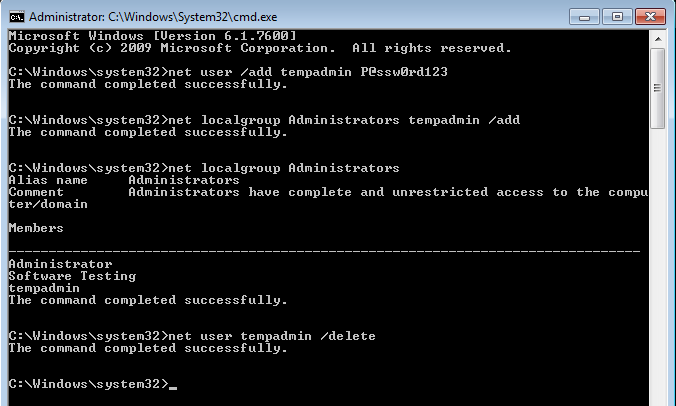
Local administrator accounts play a critical role in Windows system administration. They are commonly used for initial device setup, offline troubleshooting, break-glass access, or environments where domain connectivity is unavailable.
This article walks through how to create, assign, and remove local administrator accounts on Windows computers using built-in command-line tools. These commands work on Windows 10, Windows 11, and Windows Server editions.
When and Why Local Admin Accounts Are Used
Local administrator accounts are typically required in scenarios such as:
- Initial system provisioning before domain or Entra ID join
- Offline troubleshooting when domain credentials cannot be validated
- Break-glass recovery accounts
- Standalone or workgroup machines
- Temporary elevated access during repairs or migrations
Because local admin accounts have full control over the system, they should be tightly managed, documented, and removed when no longer required.
Prerequisites
- You must be logged in as an existing local administrator
- Command Prompt must be opened with Run as administrator
Create a New Local User Account
The first step is to create a standard local user account.
net user /add username passwordExample:
net user /add tempadmin P@ssw0rd123This command:
- Creates a local user named
tempadmin - Sets the specified password
- Does not grant administrative privileges yet
Security Note
Passwords entered this way are visible in command history and logs. In production environments, consider setting a temporary password and forcing a change, or using secure provisioning methods where possible.
Add the User to the Local Administrators Group
To grant administrative privileges, the user must be added to the local Administrators group.
net localgroup Administrators username /addExample:
net localgroup Administrators tempadmin /addThis command:
- Adds the user to the built-in Administrators group
- Immediately grants full local admin rights
Group membership changes take effect instantly, though existing sessions may need to be logged off and back on.
Verify Local Administrator Membership
You can confirm the account was added successfully by listing the Administrators group members.
net localgroup AdministratorsThis will display all users and groups with local admin access on the system.
Remove a Local User Account
When the account is no longer needed, it should be removed to reduce attack surface.
net user username /deleteExample:
net user tempadmin /deleteThis command:
- Deletes the local user account entirely
- Automatically removes group memberships
- Does not delete the user profile folder
Optional Cleanup
If required, user profile folders can be manually removed from:
C:\Users\usernameOnly do this after confirming no data needs to be retained.
Common Errors and Troubleshooting
- Access is denied Ensure Command Prompt is running as administrator
- The user name could not be found Verify spelling and confirm the account exists
- System error 1376 The specified group does not exist. Ensure the group name is exactly
Administrators