
Understanding DNS in Active Directory
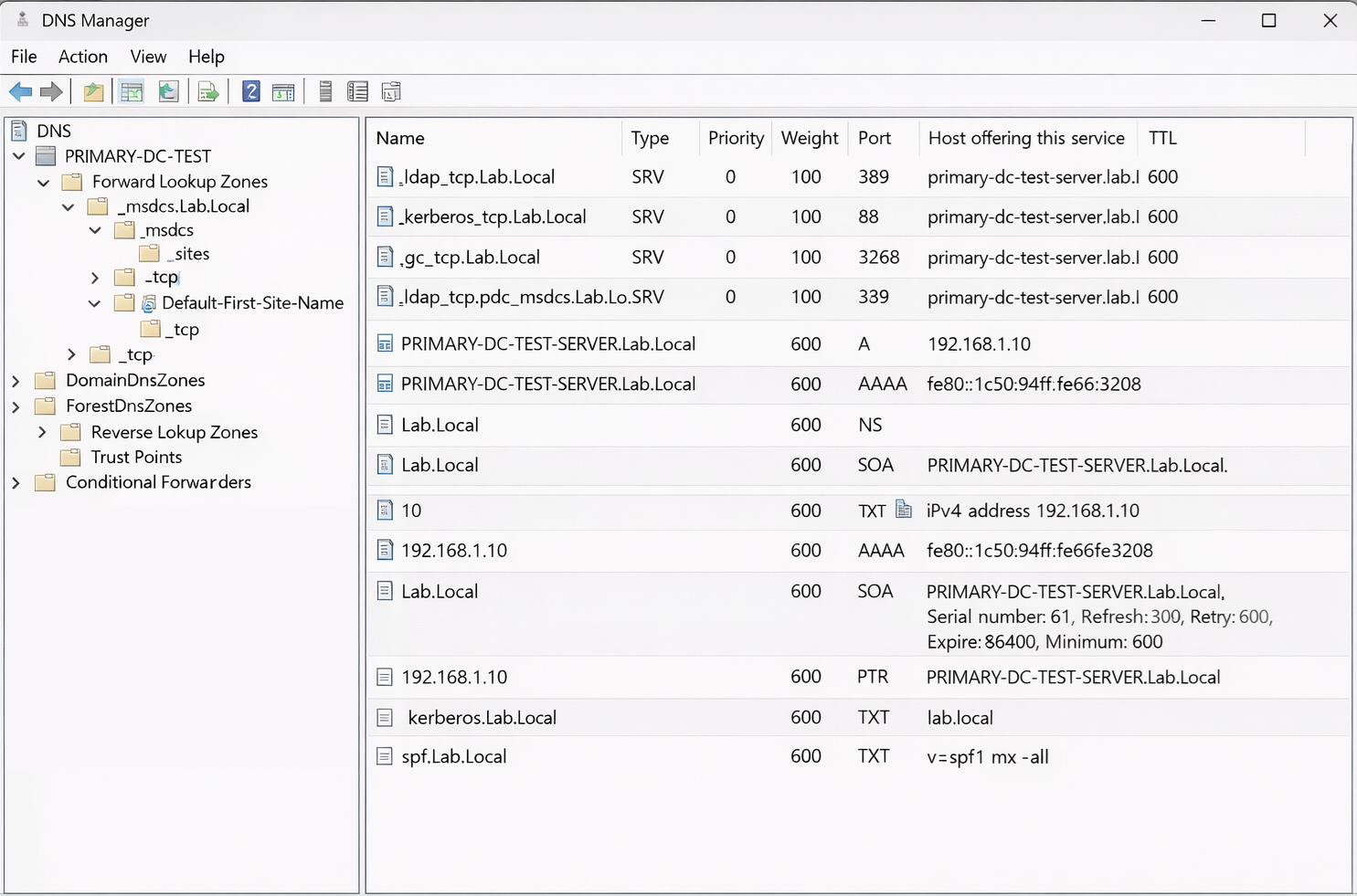
How Domain Controllers, SRV Records, Kerberos, and NETLOGON Actually Work
When most people think of DNS, they think of simple name resolution. A hostname resolves to an IP address, and that is it. In an Active Directory environment, DNS plays a much deeper role. It is not just name resolution. It is service discovery, authentication routing, and identity infrastructure.
This article explains how DNS works in Active Directory from the ground up, using a newly installed primary Domain Controller as the reference point.
1. DNS in Active Directory Is Service Discovery
In a non-domain environment, DNS answers one main question:
What IP address belongs to this name?
In Active Directory, DNS answers a different and more important question:
Which server provides this service, and how do I reach it?
That is why Active Directory depends heavily on DNS records that describe services, not just hosts.
2. A Records and AAAA Records
A Records
An A record maps a hostname to an IPv4 address.
primary-dc.lab.local → 10.0.0.10Every Domain Controller must have a correct A record. When a client learns the name of a Domain Controller from DNS, it uses the A record to actually connect.
If an A record is missing or stale:
- DNS queries succeed
- Connections fail
- Errors appear unrelated to DNS
This is extremely common in DHCP based lab environments.
AAAA Records
An AAAA record maps a hostname to an IPv6 address.
Windows enables IPv6 by default and prefers it when available. Domain Controllers automatically register AAAA records if IPv6 is enabled.
Even if you believe you are not using IPv6:
- Windows is
- Kerberos may use it
- LDAP may bind to it
- SMB may prefer it
Partially broken IPv6 causes intermittent authentication and policy issues that are notoriously difficult to troubleshoot.
3. SRV Records and Why They Exist
SRV records allow DNS to describe services.
Instead of mapping a name to an IP, an SRV record describes:
- A service
- A protocol
- A port
- A target server
- Priority and weight
Active Directory cannot function without SRV records.
4. Core Active Directory SRV Records
_ldap
LDAP is how clients read directory data.
Used for:
- Finding Domain Controllers
- Querying users and groups
- Reading Group Policy metadata
If LDAP SRV records are broken:
- Domain join fails
- Logons fail
- Group Policy fails
_kerberos
Kerberos is how clients authenticate securely.
LDAP answers who you are. Kerberos proves it cryptographically.
Kerberos SRV records point clients to Key Distribution Centers on Domain Controllers.
If Kerberos SRV records are broken:
- Users cannot log in
- Services cannot authenticate
- Time-related errors appear
_gc (Global Catalog)
The Global Catalog is a special role that a Domain Controller can hold.
It contains a partial, read-only copy of objects from all domains in the forest, and only commonly searched attributes.
The Global Catalog is used for:
- Universal group membership
- Forest-wide searches
- Exchange address lookups
- Cross-domain authentication
Global Catalog traffic uses:
- TCP 3268 for LDAP
- TCP 3269 for LDAPS
_pdc (PDC Emulator)
The PDC Emulator is a FSMO role.
FSMO stands for Flexible Single Master Operations. These are tasks that must be handled by one authoritative Domain Controller to prevent conflicts.
The PDC Emulator:
- Coordinates password changes
- Resolves authentication conflicts
- Acts as the domain time authority
- Handles account lockouts
Clients and DCs locate the PDC Emulator using a dedicated SRV record so urgent authentication issues can be resolved immediately.
5. What a Global Catalog Is
A Global Catalog is not a separate server. It is a role held by a Domain Controller.
It acts like an index: fast, forest-wide, and partial.
Without a Global Catalog:
- Logons may fail
- Universal groups break
- Exchange lookups fail
Most environments configure every DC as a Global Catalog for redundancy.
6. Special DNS Zones in Active Directory
_msdcs
The _msdcs zone is reserved for Microsoft Directory Services.
It contains:
- Critical SRV records
- Domain Controller GUID mappings
- Replication metadata
Clients and DCs know to look here automatically.
_sites
Site-aware SRV records allow clients to locate the closest Domain Controller based on IP subnet.
This reduces:
- Logon latency
- WAN traffic
- Cross-site authentication issues
Sites are enforced through DNS records.
7. Zone Integrity Records
SOA (Start of Authority)
Every DNS zone has one SOA record.
It defines:
- The authoritative server
- Serial number
- Replication timing values
Even in AD-integrated DNS, SOA is required for zone health.
NS (Name Server)
NS records define which servers are authoritative for a zone.
They allow:
- Proper referrals
- Zone replication
- Resolver trust
Incorrect NS records cause inconsistent DNS behavior that is difficult to diagnose.
8. PTR Records (Reverse Lookup)
PTR records map IP addresses back to hostnames.
They are used for:
- Diagnostics
- Logging
- Kerberos validation
- Administrative clarity
Forward lookups make things work. Reverse lookups make things debuggable.
9. Optional but Common DNS Records
CNAME
CNAME records create aliases that map one name to another name.
They are generally safe for applications, but risky for Domain Controllers and authentication services.
Microsoft strongly discourages using CNAMEs for LDAP or Kerberos endpoints.
MX
MX records define mail routing for a domain.
They are not required for Active Directory itself, but are common in labs and Exchange environments.
TXT
TXT records store free-form text and are commonly used for:
- SPF
- DKIM
- Domain verification
- Microsoft 365 integration
10. DNS and Client Configuration
Why clients must use AD DNS
Domain members must use only internal AD DNS servers.
If a router or public DNS server is used:
- SRV records do not exist
- DC discovery fails
- Authentication becomes unreliable
Correct design:
- Clients use DCs for DNS
- DCs use forwarders for external resolution
11. What Happens During a Real Domain Logon
Step 1: DC discovery
The client queries SRV records to locate a Domain Controller.
Step 2: Kerberos authentication
The client performs:
- AS-REQ / AS-REP to obtain a Ticket Granting Ticket (TGT)
- TGS-REQ / TGS-REP to obtain service tickets
No passwords are sent over the network.
Step 3: Global Catalog lookup
If universal groups are involved, the client contacts a Global Catalog.
Step 4: Policy and directory access
LDAP is used to read directory data, and SMB is used to download policy files.
12. SMB, SYSVOL, and NETLOGON
SMB
SMB (Server Message Block) is the Windows file sharing protocol.
Used for:
- SYSVOL
- NETLOGON
- Group Policy files
- Logon scripts
NETLOGON
NETLOGON is a service, a secure channel, and a network share.
It handles:
- Secure channel establishment
- Authentication coordination
- DNS SRV registration
- Trust relationships
If NETLOGON fails:
- Authentication breaks
- DNS records may disappear
- Trust errors occur
13. Testing DNS and AD Health
nslookup examples
nslookup -type=SRV _ldap._tcp.dc._msdcs.domain.local
nslookup -type=SRV _kerberos._tcp.domain.local
nslookup -type=SRV _gc._tcp.domain.local
nslookup -type=SRV _ldap._tcp.pdc._msdcs.domain.local
nltest examples
nltest /dsgetdc:domain.local
nltest /dsgetdc:domain.local /GC
nltest /sc_verify:domain.local
nltest /dclist:domain.local
These commands validate how Windows actually interprets DNS, not just what exists on paper.
14. The Mental Model That Makes AD Click
- DNS finds services
- Kerberos proves identity
- LDAP reads directory data
- SMB retrieves files
- NETLOGON ties it all together
Once this model is understood, Active Directory troubleshooting becomes methodical instead of guesswork.