

Upgrading to Ubuntu 24.04.02 – ” Oh no! Something went wrong “

How I Fixed My Ubuntu System After Upgrading to 24.04.2 After upgrading to Ubuntu 24.04.02 LTS, my machine would no longer boot. Since I was using a virtual machine, I tried rolling back to a previous snapshot and reinstalling the update, but I ran into the same problem. After much googling and trying different things, […]
Repairing Corrupt Windows System Files
System File Checker and DISM Commands Windows provides built-in tools for diagnosing and repairing system corruption. System File Checker (SFC) validates and repairs protected system files, while Deployment Image Servicing and Management (DISM) analyzes and restores the Windows component store. These commands are commonly used during troubleshooting to resolve issues such as corrupted services, damaged […]
How to Show Hidden Files and Folders on macOS
How to Show Hidden Files and Folders on macOS There are a few simple ways to reveal hidden files and folders in macOS. Pick the method you prefer: a quick keyboard toggle, a Terminal command that persists, or the same toggle inside Open/Save dialogs. 1) Quick Toggle in Finder (fastest) Open any Finder window. Press […]
Microsoft Word – Use a VBA Macro to Delete All Images
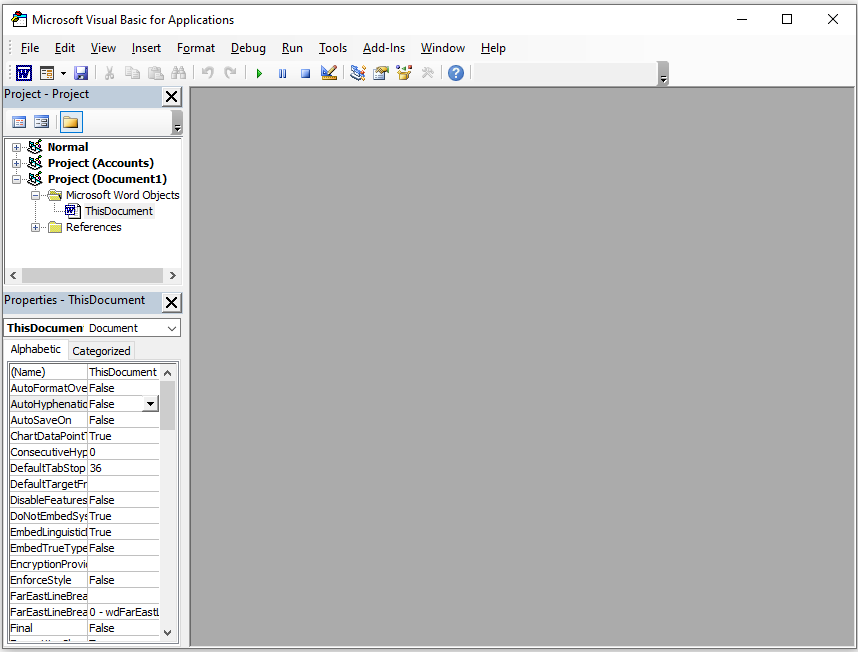
You can use a VBA macro to find and delete all pictures in a Microsoft Word document. Before starting, make sure macros are allowed in your document. If they are not, save the file as a “.docm” Word document to allow macros to run. 1.) Press Alt + F11 to open the Visual Basic for […]
Microsoft Teams On Mac (Monterey – macOS 12) – Privacy and Security Permissions

Microsoft Teams on macOS depends on several Privacy and Security permissions, and when those permissions are not granted, Teams will either prompt the user to enable them or block the feature until access is approved. In real-world support, users frequently click Don’t Allow, dismiss the prompt, or complete the prompt but still need to enable […]
Excel VLOOKUP Explained: Step-by-Step Example
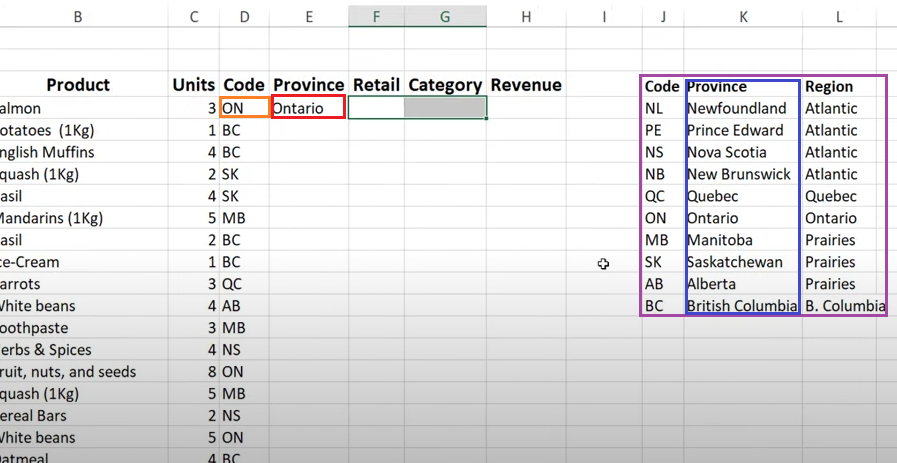
How to Use VLOOKUP in Excel (Step-by-Step Example) VLOOKUP is one of Excel’s most commonly used formulas. It allows you to search for a value in a table and return related data from another column in the same row. In this example, we will use VLOOKUP to convert a province code into a full […]
Powershell Script – Get the Most Recent User Login / Logoff Events

This great little Powershell script will generate a .csv file, that you can open in excel, which will list each time a user logged in and logged out from the computer or server you run it on. I believe the only downside is that the list only goes as far back as the logs do […]
How to Set a Static IP Address on a Cisco Switch or Router

This guide will go through the brief process of Assigning a static management IP Address for your Cisco switch or router, using the command line. 1.) Connect to your switch or router, using your Terminal Emulator. I will be using a computer with Putty installed on it, connected to the switch using a Cisco Rollover […]
How to Close Fake Anti-Virus Pop-Up Alert Scams

You are innocently browsing the internet and suddenly a window pops up informing you that your system is either infected or damaged. You take a closer look at the pop-up, and see that it is from an official Anti-Virus company, such as Norton. You try to close our of the window, by clicking on the […]
How to Disable RSS Feeds in WordPress
WordPress enables RSS and Atom feeds by default. If you do not want your site content or comments to be shared through RSS feeds, you can disable them by adding a few lines to your theme’s functions.php file. Before You Start Use a child theme if possible. Theme updates can overwrite functions.php. Make a quick […]