
Windows Vista, 7, 8, 10, 11 – GodMode
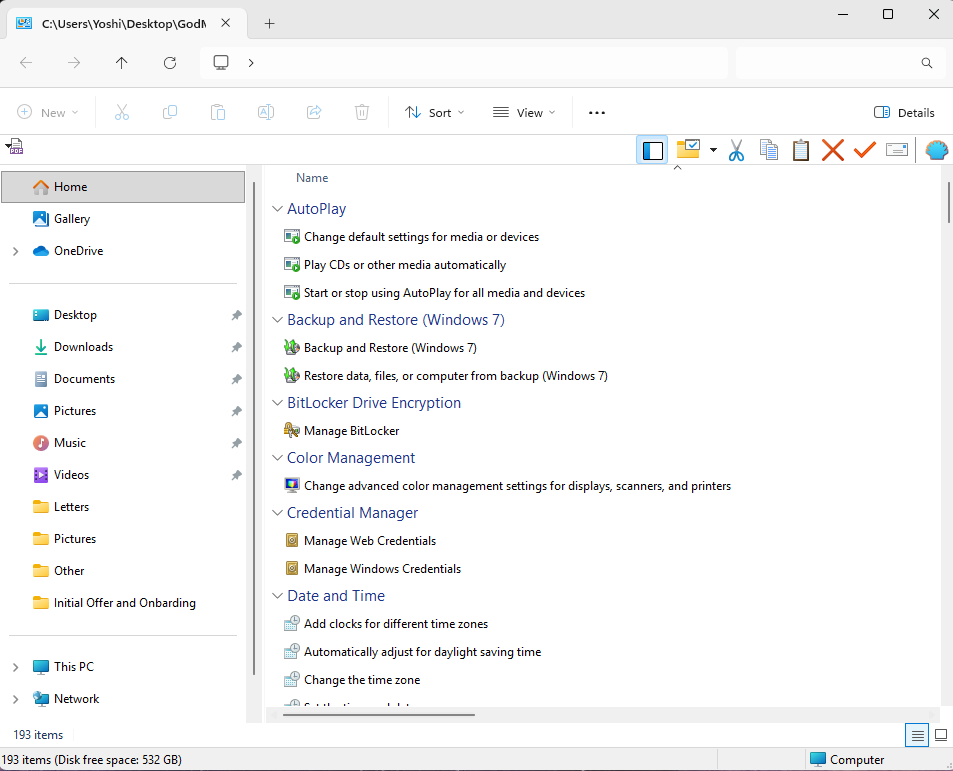
How to Enable Windows God Mode in Windows 10 and Windows 11
Windows includes a hidden feature known as God Mode, a special control panel folder that provides direct access to more than 200 advanced system settings in one place. Instead of navigating through multiple menus, God Mode organizes every available configuration option into a single, easy-to-browse interface. This can be especially helpful for power users, IT professionals, and Systems Administrators who want a centralized way to adjust settings quickly.
What Is Windows God Mode?
God Mode is simply a folder shortcut that exposes the full set of Windows Control Panel and administrative tools. It is not a hack or unsupported feature but rather an internal Windows GUID. When the folder is named using the special identifier, Windows transforms it into an advanced control panel menu.
The feature is activated by creating a folder and renaming it to the following:
GodMode.{ED7BA470-8E54-465E-825C-99712043E01C}
Once created, the folder icon changes automatically and opens a categorized list of configuration tools when clicked.
What You Can Access in God Mode
Inside the God Mode folder, you will find categorized tools such as:
-
- Administrative Tools
- Backup and Restore
- Credential Management
- Device Manager
- Disk Management